
Play GTA 6 in first person on foot: the View Button camera glitch
- Medium
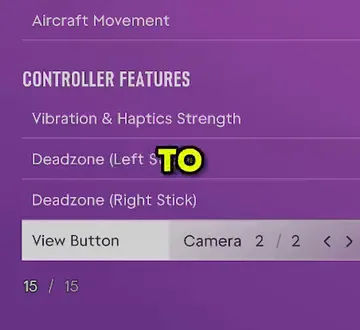
Set the View Button to Camera, then in a vehicle open the phone camera with the right timing: first-person view stays on foot all session.
Full description
Glitch shown in a short reel by OlAvogadro that unlocks a first-person view on foot, which the game does not normally offer. Steps: 1) Open Settings > Controller and scroll to View Button (0:05). 2) Change it from Map to Camera (0:13). On PS5 this is the Touchpad; on Xbox it is the View button. 3) Get into any vehicle and bring up the phone. 4) Press the back button and the camera button at the same time (0:18-0:24): Circle on PS5, B on Xbox. 5) If timed correctly, the camera stays in first person when you get out, for the whole session: on foot, in missions and in combat. Some situations can break it. 6) To go back to the normal camera, reload a save from Game > Load (0:38-0:42). Unverified: the creator warns it could be patched quickly.